跳到内容
跳到内容 
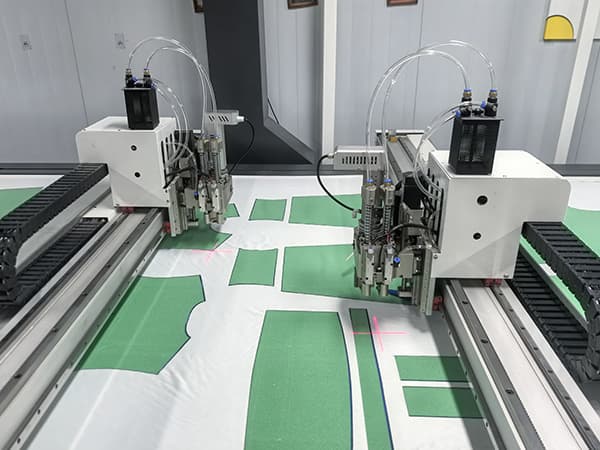
Printed fabric looks easy. Then it shrinks, stretches, shifts, and laughs at manual cutting.
A Vision Cutting Machine should match your printed fabric, recognition method, feeding system, cutting tool, and production volume. For sublimation textiles, sportswear, and home fabrics, camera recognition, contour cutting, conveyor feeding, and proper tool selection decide the final cutting quality.
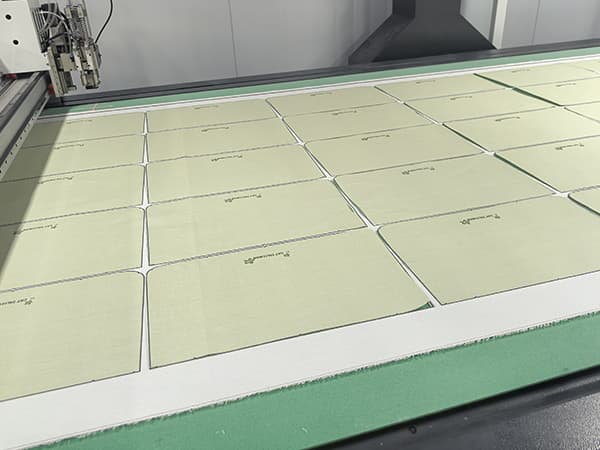
Choosing a machine for printed fabric is not only about cutting speed. I always tell customers one simple thing: the camera finds the target, but the whole machine decides the result. The fabric may be soft. The printed pattern may be distorted. The edge may need to be smooth. The order may be small today and large tomorrow.
So, when I choose a Vision Cutting Machine for printed textiles, I do not only ask, “Can the camera see the pattern?” I also ask, “Can the machine feed the roll fabric smoothly? Can it correct the cutting path? Can the tool cut without pulling the fabric? Can the system support continuous production?”
Let us break this down like an engineer, not like a brochure.
What Is a Vision Cutting Machine for Printed Fabric?
Printed fabric is not always where the design file says it is. That is the first problem.
A Vision Cutting Machine uses a camera to scan printed textiles, recognize printed contours or marks, and guide the cutting tool along the real printed pattern. It is useful for sublimation fabric, sportswear, home textiles, soft signage, and custom printed pieces.
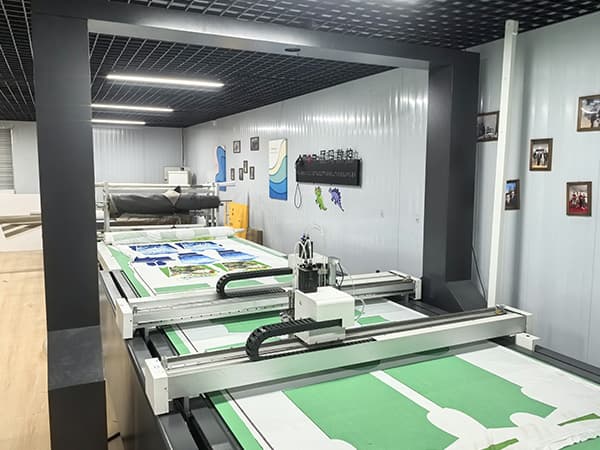
The Camera Does Not Just Take a Photo
A good vision cutting system does more than “look” at the fabric. It captures the fabric surface, finds the printed pattern, compares it with recognition rules, and generates the cutting path. Many current vision cutting systems use cameras to scan fabric, detect printed contours, or read registration marks before cutting. This is why camera recognition has become a common solution for sublimation textile cutting and printed contour cutting.
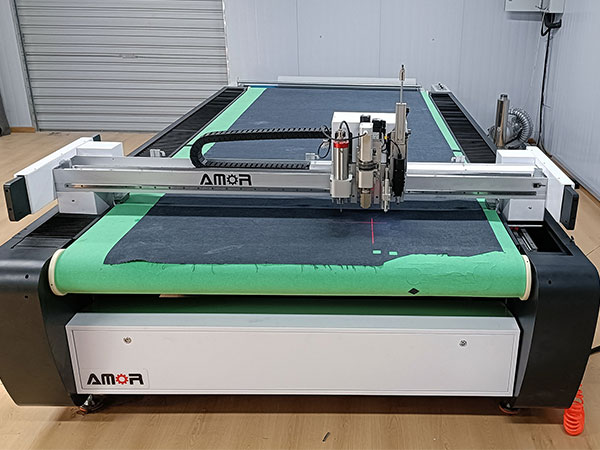
For AMOR CNC machines, I pay close attention to the full cutting process. The camera must scan clearly. The software must recognize quickly. The conveyor table must keep the fabric stable. The cutting tool must move smoothly. If one part is weak, the final edge will not be clean.
Why Printed Textiles Are Difficult to Cut
Printed fabric has three common problems.
| Problem | What Happens | Machine Requirement |
|---|---|---|
| Fabric shrinkage | The printed size changes after heat transfer | Camera recognition and path correction |
| Fabric stretch | The pattern moves during feeding or cutting | Stable feeding and proper tool selection |
| Pattern deviation | The printed contour does not match the original file | Real contour recognition or feature point alignment |
This is why I do not recommend choosing a machine only by working size or price. Printed fabric needs a system solution.
A simple cutting machine follows a file. A Vision Cutting Machine follows the real printed result. That is the big difference.
How Should the Camera Recognize Sublimation Printed Fabric?
A beautiful print can become waste if the camera cannot read it correctly.
For sublimation printed fabric, I usually recommend two recognition methods: black contour recognition and feature point recognition. The right method depends on whether the printed design has a closed contour and whether the cutting shape is complex.
Method 1: Add a 1mm Black Contour Around the Pattern
This is the most practical method for many sublimation fabric applications. During heat transfer printing, the customer adds a 1mm black outline around the printed shape. The vision system can then identify the outline quickly and generate the cutting path.
I like this method because it is simple and stable. The camera has a clear target. The software can recognize the pattern edge. The operator does not need to spend too much time adjusting the file.
This method works well for:
| Application | Typical Product |
|---|---|
| Sportswear | Jerseys, cycling wear, yoga wear |
| Home fabrics | Cushion covers, curtains, table covers |
| Soft signage | Flags, banners, display cloth |
| Custom textiles | Printed decorative fabric pieces |
The black contour gives the machine a clear boundary. It is like drawing a road for the cutting tool. Without this road, the camera may still work, but recognition becomes more sensitive to color contrast, lighting, fabric texture, and printing quality.
Method 2: Use Feature Points and Imported Cutting Contours
Some printed graphics do not have a complete closed contour. In this case, I usually recommend using feature points. The customer imports the cutting contour file into the software. Then the camera identifies specific feature points on the fabric. The system aligns the imported cutting path with the actual printed position.
This method is more suitable for simple and repeated shapes. It is also useful when the printed pattern does not have a strong edge for contour recognition.
For example, if a factory cuts the same printed sportswear panel every day, feature point recognition can be efficient. The operator prepares the contour file in advance. The camera only needs to find the location points. Then the machine cuts according to the corrected position.
Which Recognition Method Should You Choose?
| Recognition Method | Best For | Advantage | Limitation |
|---|---|---|---|
| 1mm black contour | Complex printed patterns | Easy recognition and flexible cutting | Needs outline added during printing |
| Feature points + imported contour | Simple repeated shapes | Stable for batch production | Needs accurate design file preparation |
My suggestion is direct. If the printed pattern allows a black contour, use it. It is easier for operators and more friendly for production. If the pattern has no closed outline, use feature points and imported contour files.
What Machine Structure Matters for Continuous Textile Cutting?
A good camera cannot save a weak feeding system. I learned this the hard way.
For printed textiles, the machine structure must support roll feeding, stable adsorption, smooth conveyor movement, and accurate repeated positioning. The cutting process should not stop after one piece. It should support continuous automatic production.
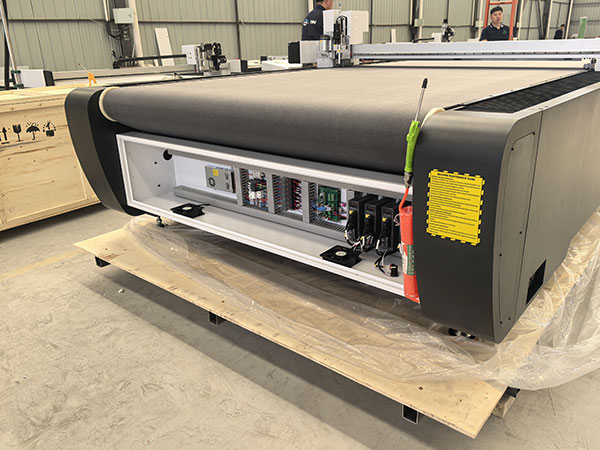
Conveyor Feeding Is Very Important
Printed fabrics are often supplied in rolls. If the machine only works on fixed sheets, the operator must load and unload material many times. This wastes labor. It also increases positioning errors.
A conveyor feeding system allows the machine to feed the fabric forward automatically. The camera scans the new cutting area. The system recognizes the printed pattern. Then the tool cuts the contour. After cutting, the conveyor moves again.
This process is useful for medium and large production orders.
Typical continuous workflow:
Roll Fabric → Auto Feeding → Camera Scanning → Contour Recognition → Cutting → Collect PiecesCurrent vision cutting solutions in the market often combine camera scanning with automatic feeding and conveyor tables to keep textile cutting continuous.
Fabric Fixing Should Match the Material
Many customers think stronger vacuum always means better fixing. That is not always true. Fabric is breathable. If the fabric allows too much air to pass through, the vacuum table cannot create a strong vacuum state like it does with leather or coated fabric.
So, the machine must reduce fabric movement in different ways. The conveyor surface must be flat. The feeding must be smooth. The tool must not pull the textile. The cutting path should be optimized.
For very breathable fabrics, tool selection becomes even more important. If the wrong knife drags the fabric, the edge may shift. Then the camera can recognize correctly, but the final cut is still wrong.
Simple Dimension View
Camera Accuracy     ██████████
Feeding Stability   █████████
Tool Suitability    ██████████
Vacuum Fixing       ███████
Software Matching   █████████
Operator Skill      ██████
This is how I look at printed fabric cutting. The camera is important, but it is not alone. The full system decides whether the machine is suitable for sportswear, home fabrics, and sublimation textiles.
Which Cutting Tool Is Better for Printed Textiles?
The wrong tool can stretch the fabric before it cuts it. That is expensive.
For printed textiles, I usually recommend choosing the tool based on fabric thickness, elasticity, air permeability, and edge quality requirement. The common choices include rotary wheel tools, oscillating cutting tools, punching tools, and marking or labeling tools.
Rotary Wheel Tool for Many Soft Fabrics
For many soft textile materials, the rotary wheel tool is a very practical choice. The blade rolls through the fabric. It reduces pulling force during cutting. This is very useful for breathable or stretchable fabrics.
In my experience, many fabric cutting problems are not caused by the camera. They are caused by tool drag. The camera gives the correct path, but the tool pulls the fabric slightly during cutting. Then the edge is no longer aligned with the printed pattern.
A rotary wheel tool can reduce this risk. It is suitable for many single-layer printed textiles, sportswear fabrics, and soft home fabric materials.
Oscillating Knife for Thicker or Tougher Textile Materials
The oscillating cutting tool moves up and down at high frequency. It is better for thicker fabric, composite textile materials, and some materials that need stronger cutting force.
For normal sublimation sportswear fabric, I do not always choose the oscillating knife first. If the fabric is thin and easy to stretch, the rotary wheel tool may give a better edge. But if the fabric is thicker, harder, or has a backing layer, the oscillating tool becomes more useful.
Punching and Marking Tools for Complete Production
Sportswear and home textile production may need more than contour cutting. Some pieces need holes, notches, sewing marks, or labels. In that case, the machine can be configured with punching tools, marking tools, or label systems.
| Tool Type | Best Use | My Recommendation |
|---|---|---|
| Rotary wheel tool | Thin and soft printed fabric | First choice for many textile jobs |
| Electric oscillating tool | Thicker fabric or composite fabric | Use when more cutting force is needed |
| Punching tool | Holes and positioning points | Useful for garment production |
| Marking or labeling tool | Sewing marks and part identification | Good for batch management |
A Vision Cutting Machine should not be treated as only a camera machine. It should be treated as a full textile cutting workstation.
How Should Buyers Choose the Right Vision Cutting Machine Size?
A small table saves money at first. Then it limits every large order later.
Machine size should match fabric width, printed pattern size, feeding method, and production plan. For sportswear, home fabrics, and soft signage, I usually check both cutting width and continuous feeding length.
Cutting Width Comes First
For roll fabric, the machine width must match the fabric width. If the material is 1600mm wide, the effective cutting width should not be smaller than the real working width. If the customer cuts wider home textile fabric or soft signage fabric, the machine width may need to be customized.
A machine that is too narrow creates waste. The operator must cut the fabric before loading it. This reduces efficiency and may damage the roll production process.
Working Length Depends on Production Mode
For continuous roll cutting, the table length does not mean the maximum production length. The conveyor system can feed the material forward section by section. But the working length still affects each scanning and cutting cycle.
A longer working area can reduce feeding frequency. It can also allow more pieces to be nested in one cutting zone. But a longer machine also requires more factory space.
My Practical Selection Rule
| Buyer Type | Suggested Focus | Reason |
|---|---|---|
| Small custom workshop | Camera accuracy and easy operation | Many small orders and frequent changes |
| Sportswear factory | Conveyor feeding and tool speed | Repeated panels and batch production |
| Home fabric factory | Wider working area | Curtains, cushions, and wider fabric |
| Soft signage producer | Large format recognition | Flags, banners, and printed graphics |
I usually ask customers to send three things before I recommend a size: material width, largest printed pattern size, and daily production target. Without these three details, the machine choice is just guessing.
How Does Software Affect Contour Cutting Quality?
Bad software makes a good machine look stupid. I have seen it happen.
For printed textiles, the software should support camera scanning, contour recognition, feature point alignment, imported cutting files, automatic nesting, and path optimization. The operator should not need to fight with the system every day.
Recognition Must Be Easy to Set
A good system should let the operator set recognition rules clearly. For black contour recognition, the software should identify the contrast between the printed outline and fabric background. For feature point recognition, the software should align the imported contour with the real printed position.
Some vision cutting solutions detect contours based on color contrast between the printed outline and the material background. This shows why clear outline design and stable printing quality are important for automatic contour recognition.
Cutting Path Needs Compensation
Printed fabric may shrink after heat transfer. It may also stretch during feeding. The software should correct the cutting path according to the scanned result. This is one of the key values of a vision system.
If the machine only cuts according to the original design file, it cannot solve real print distortion. A true vision solution should cut according to the actual printed fabric, not only the original drawing.
Nesting Saves Material
Automatic nesting is also important. When the software arranges pieces well, the factory can reduce fabric waste. This matters more when the printed fabric is expensive or when orders are customized.
A simple workflow should look like this:
Scan → Recognize → Correct → Nest → Cut → Feed AgainThe operator should understand this process quickly. If the software is too complex, training becomes difficult. In real production, simple operation is not a small advantage. It directly affects labor cost and order delivery.
What Should Buyers Test Before Ordering a Vision Cutting Machine?
A brochure cannot prove cutting quality. A sample test can.
Before buying a Vision Cutting Machine, I always suggest testing real printed fabric, real graphics, real cutting speed, and real feeding conditions. A machine that cuts a perfect demo sample may still fail on your actual fabric.
Test the Real Printed Fabric
The buyer should not only send a beautiful design file. The buyer should send the real printed fabric. Sublimation fabric may shrink after heat transfer. The printed contour may not match the original drawing. The camera must work with the final material, not the perfect computer file.
I usually ask customers to send samples with different colors, different shapes, and different print sizes. This helps us check whether the camera can recognize the contour clearly.
Test Both Recognition Methods
If the customer can add a 1mm black outline, we test contour recognition. If the customer cannot add a closed outline, we test feature points and imported cutting contours.
This is important because each method has a different setup logic. The customer should know which method fits daily production before the machine arrives.
Test Edge Quality and Fabric Movement
The cutting result should be checked from several points.
| Test Item | What to Check |
|---|---|
| Contour accuracy | Whether the cut follows the printed edge |
| Edge quality | Whether the fabric is clean and smooth |
| Fabric movement | Whether the material shifts during cutting |
| Feeding repeatability | Whether continuous cutting stays stable |
| Tool marks | Whether the tool pulls or damages the fabric |
Test Operator Workflow
The best machine is not only accurate. It must also be easy to use. If one job needs too many manual steps, the production speed will drop.
For AMOR CNC projects, I prefer to explain the full workflow before the customer orders. The customer should know how to prepare printed outlines, how to set feature points, how to feed the roll fabric, and how to choose the tool. This saves many problems after delivery.